Inventory errors that lead to costly oversells are a sign that your back-office and storefront are out of sync. As sales grow, manual work becomes a bottleneck that slows down your business. You need a reliable way to link your digital shop to your financial system.
Explore our Shopify NetSuite Accelerator to automate your integration in weeks, not months.
A Shopify NetSuite integration links your web shop with your ERP system to move data on its own between the two sites. This syncs stock, orders, and customer details in real time to end slow manual work. You can use pre-built tools, middleware, or custom code to build this link. The best choice for your company depends on your needs and your budget. Good setup makes sure that returns and tax rules map to your books to stop money errors. According to NetSuite, these tools help data flow between the ERP and top web stores so your business runs well. Streams Solutions has a proprietary Accelerator that can set up this link in just three to four weeks for fast growth.
Choosing the right path requires a clear view of how these systems talk to each other. You must look at the different ways these two tools can work as one. The first step involves Understanding the Shopify NetSuite Integration Landscape.
Understanding the Shopify NetSuite Integration Landscape
Choosing the right way to link your store to your ERP is a big step. A good Shopify NetSuite integration helps you move data between systems without manual work. This leads to faster shipping and more correct stock counts. Most firms look at three main paths: pre-built connectors, middleware platforms, and custom builds. Each choice has its own costs and setup times. You should start by checking your needs to see which one fits your growth goals.
Pre-built connectors for fast results
Pre-built connectors are the most common choice for small shops. These tools often take only two to four weeks to set up. They are easy to use because they have built-in maps for orders and customers. Prices for these direct links start at about $99 per month. NetSuite’s own connector is a strong choice for many. It lets you link your store to your ERP with very little custom code. These tools handle two-way sync for your products, orders, and customer data.
Another top option is the Celigo Shopify-NetSuite Integration App. It offers a pre-built way to keep your store and ERP in sync. In March 2026, Celigo also launched a new B2B tool. This tool helps auto-sync orders and pricing for business-to-business sales. If you need a fully auto-linked system, you can also look at NetScore on the SuiteApp site. It provides real-time sync to keep your stock levels correct across all your sales channels.
Middleware and iPaaS for complex needs
As your business gets bigger, your needs often get more complex. You might have special rules for how you ship items or how you track taxes. This is when an Integration Platform as a Service (iPaaS) is helpful. Middleware tools like Celigo, Dell Boomi, and Jitterbit offer more power than a simple connector. These platforms excel at handling tough workflows that go beyond a basic data sync. They allow you to build custom logic to solve unique business problems.
While these tools are powerful, they do cost more. Most iPaaS plans range from $400 to more than $2,000 per month. They also take longer to set up, with some projects lasting up to 12 weeks. But the extra cost is often worth it for larger firms. These systems reduce manual errors and help you scale your work. If you want to grow, you may need expert ERP implementation insights that include a solid middleware plan.
Custom API builds for total control
A custom API build is the third main path. This way gives you the most control over your data. You can build exactly what you need without being limited by an app. This is the best choice if you have a very unique business model. But it also comes with the highest level of risk and work. You will need to hire experts to write and keep up the code. This path often takes more time and money than other ways. It is best to check all other options before you choose a custom build.
Most experts suggest you look at your current data flow before you start. You should check if you need secure NetSuite data exchange methods for your private files. A custom build can handle these needs, but it takes a lot of care. Always plan your field mapping before you write any code. This ensures that your stock and order data move smoothly between Shopify and NetSuite every time.
Critical Challenges in Shopify NetSuite Integration
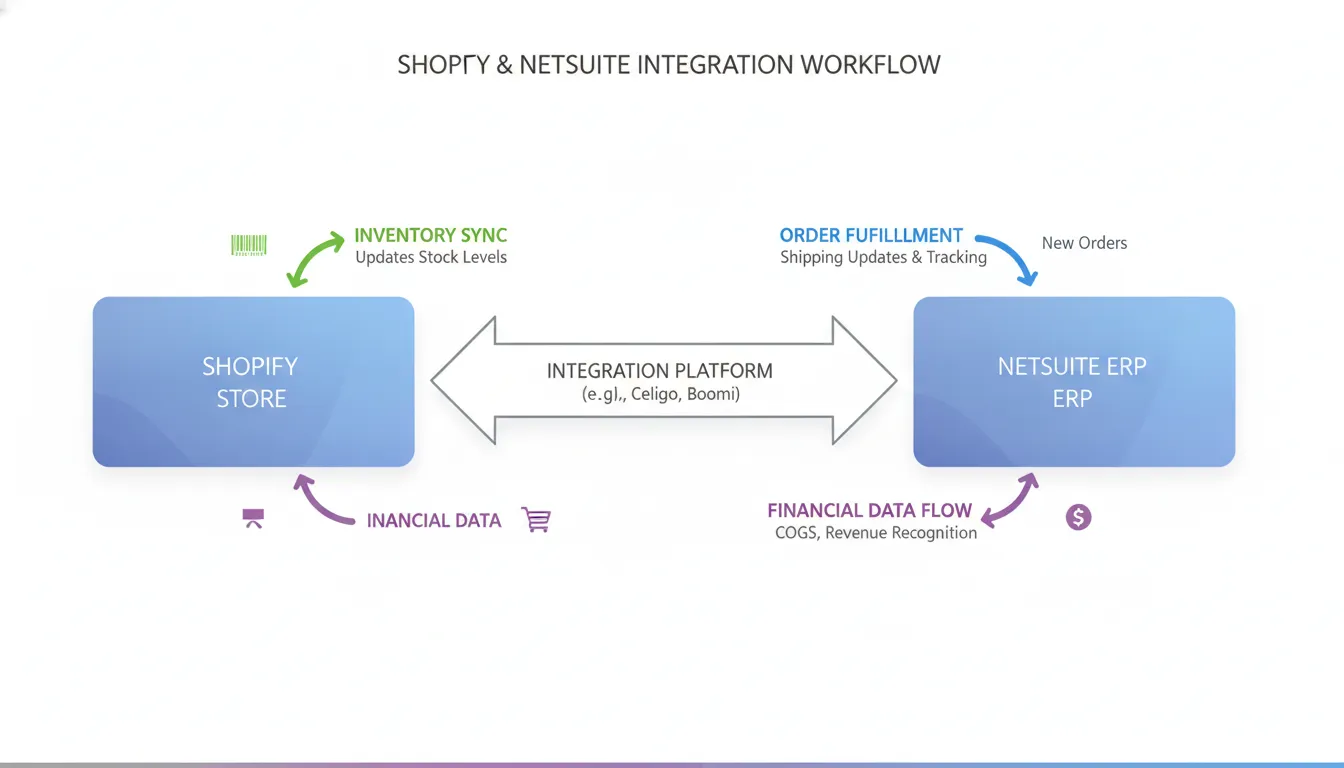
A Shopify NetSuite integration should automate your data flow. But many businesses face technical hurdles that lead to manual work and data errors. These pain points often start when order volumes grow and systems cannot keep up.
Multi-location inventory sync issues
Maintaining accurate stock levels across many sites is a top challenge for eCommerce teams. Many businesses run both online stores and physical shops or use many warehouses. Without a real-time sync, you risk overselling products you do not have. This mismatch between Shopify and NetSuite leads to canceled orders and unhappy customers. Real-time updates are needed to keep stock counts aligned across all fulfillment centers.
Complex returns and partial shipments
Returns often cause accounting errors when they are not handled well by the integration. If a refund does not update both systems at once, your financial records will not match. Partial shipments add even more stress to the process. These errors make it hard to maintain a clean automated order-to-cash workflow that keeps your financial data flowing without gaps. Some data errors in automated systems can slow down business growth, as noted in studies hosted by the National Institutes of Health (NIH).
Tax and discount mapping errors
Mapping Shopify tax rules and discounts into the NetSuite general ledger is a recurring pain point. Shopify calculates taxes based on the buyer’s location, which can change often. If these rules do not map well to your NetSuite tax codes, your tax reports will be wrong. Discounts also cause issues when they apply to some items but not others. Getting these financial details right is vital for a smooth month-end close and audit readiness.
Gaps in off-the-shelf connectors
Many users feel frustrated with basic connectors because of gaps in their pre-built flows. While these tools offer a good start, they often need custom work for complex needs. Some businesses even build their own tools to get the exact features they need. To avoid these gaps, many firms look for comparisons of integration platforms that include expert setup from the start.
Best Practices for Inventory Synchronization
Keeping stock levels right is a major challenge for growing brands. A strong integration helps you see what you have in real time. This keeps you from selling items you do not have in your warehouse. When your store and your back end talk to each other, you can fulfill orders faster and keep your customers happy. It also means your team spends less time fixing errors by hand. This leads to a smoother workflow for your entire business.
Stop Overselling with Real-Time Sync
One of the biggest problems for online stores is selling the same item twice. This often happens because the store updates too slowly after a sale. When you use a fully automated sync tool, your stock counts stay fresh on every channel at once. This is vital if you sell on both Shopify and in a local shop. Research from MIT shows that even small stock errors can lead to big losses in sales and trust. Using a tool that updates in real time ensures your data is always right. It gives you the peace of mind to sell on many platforms at the same time.
Manage Multi-Site Stock
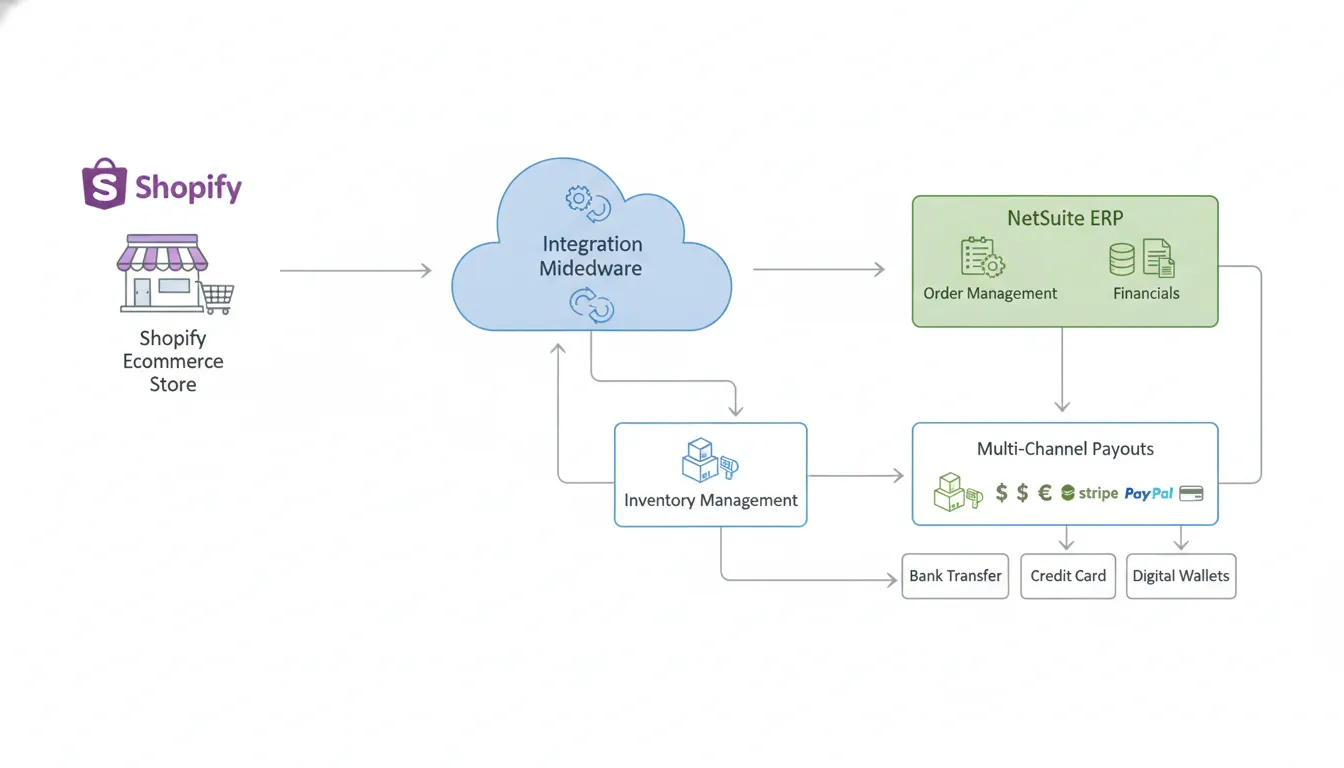
If you have stock in more than one place, things get hard fast. You might have items in a warehouse, a local store, and a third-party hub. Syncing this multi-site stock is a top hurdle for many firms today. A good setup lets you track where every item is at any moment across all sites. You can set rules to ship from the place closest to the buyer to save time. This saves you money on shipping and gets the product to the door sooner. It also helps you see which sites need more stock and which have too much. You can move stock between sites to meet demand without buying new items.
Process Returns in Both Systems
Returns can be a mess if your systems are not linked well. When a buyer sends an item back, Shopify sees the event first. But your stock counts in NetSuite must also change to reflect the new item. If you do not sync these returns, your books will have large errors. A good plan handles refunds and stock updates at the same time. This keeps your records clean and your stock counts true. It also makes the return process smoother for your team and your buyers. You can issue refunds faster, which helps build long-term trust with your client base.
Setting up these complex flows can take a very long time. Some projects take up to twelve weeks to finish from start to end. Streams Solutions offers a custom Shopify-NetSuite Accelerator that gets you live in three to four weeks. This fast setup uses proven rules to link your systems without the long wait. It helps you get the value of a pro setup while saving time and money. You can focus on growing your brand while the tech handles the heavy work. By choosing a fast path, you avoid the common gaps found in basic pre-made tools.
Optimizing Order Fulfillment and Payouts
Managing the flow from a sale to a bank deposit is the core of any retail business. A Shopify NetSuite integration connects these systems to stop manual work and human error. When a customer buys an item online, the order should move to NetSuite right away. This allows your team to start the pick, pack, and ship process without delay.
Streamlining the order to cash cycle
Moving Shopify orders into NetSuite is the first step in a clean order-to-cash cycle. You can set up rules to route orders to the best warehouse based on stock levels. This speeds up shipping and keeps costs low. For high-volume stores, using a custom software development approach ensures that large batches of order data move safely between platforms.
Accuracy is key when sending tracking info back to your clients. A tight sync means Shopify updates the moment a label is made in NetSuite. This keeps customers happy and reduces the number of support calls. If you ship items from one order in multiple boxes, the integration must handle partial shipments. This prevents accounting errors that often happen when refunds or split orders do not update correctly in both systems.
Solving payout and tax mapping issues
Reconciling sales across many channels can be a headache for your finance team. Shopify uses complex tax rules and discount codes that must map to the right lines in your NetSuite general ledger. Mapping these items wrong leads to messy books and hours of manual fixing at the end of the month. A professional setup ensures that every dollar from a Shopify payout matches a recorded sale in your ERP.
To fix these gaps, many firms look for a fast way to sync their data. Streams Solutions offers a proprietary Shopify-NetSuite Accelerator that sets up these workflows in just three to four weeks. This tool handles the tricky parts of tax mapping and payout matching so your team can focus on growth. Proper planning for these flows is as vital as the security of your data systems, ensuring your business stays compliant and agile.
How to Choose the Right Integration Approach
Selecting the best way to connect your systems is a key step in scaling your eCommerce business. You must weigh the cost against the long-term flexibility your team needs to manage growth. Most businesses find that their requirements fall into one of three main categories based on technical complexity and budget.
Pre-built connectors and apps
Direct connectors are the fastest way to get started. These apps offer a 2-4 week setup time and typically cost between $99 and $600 per month. They work well for stores with standard workflows and basic data needs. You can find these tools on SuiteApp.com, where they provide automated sync for products and inventory.
While these apps are quick to set up, they may have gaps if you have unique rules for taxes or returns. If your order-to-cash flow is complex, a basic tool might lead to manual work. You should check if a simple app can handle your specific ERP software comparison needs before you commit to one.
iPaaS and middleware platforms
Integration Platform as a Service (iPaaS) solutions like Celigo or Dell Boomi offer more power. These platforms excel at complex workflows that basic apps cannot handle. An iPaaS usually costs between $400 and $2,000 per month but provides much higher flexibility for your data mapping. According to Shopify Community, middleware is often the best choice for businesses that need to connect more than two systems or have custom logic.
These tools allow you to build custom paths for data without writing code from scratch. They are helpful if you need to manage multi-location inventory or complex discount rules. Using an iPaaS helps you avoid the high maintenance costs of a fully custom build while still giving you the control you need to scale.
Custom API integration
A custom build gives you total control over how data moves between Shopify and NetSuite. This path requires a developer to write code that connects to the APIs of both platforms. While this offers the most flexibility, it also carries the highest cost and needs ongoing support to handle platform updates. Projects of this size can take 12 weeks or more to complete.
| Approach | Cost | Setup Time | Flexibility | Best Fit |
|---|---|---|---|---|
| Pre-built Connector | Low ($99+/mo) | 2-4 Weeks | Low | Small stores with standard needs |
| iPaaS (Middleware) | Medium ($400+/mo) | 4-8 Weeks | High | Growing mid-market businesses |
| Custom API Build | High (Varies) | 10-12+ Weeks | Total | Enterprise with unique workflows |
Integration timeline expectations
The time it takes to finish your project depends on your data mapping needs. A simple setup might take just 2 weeks, while a deep integration can span up to 12 weeks. Proper planning helps you avoid common delays. You should also look into data and analytics services to ensure your core system is ready for the new data flow. Following NetSuite’s data mapping guidelines can help you stay on track and reduce errors during the launch phase.
Why Streams Solutions for Your Shopify NetSuite Integration
Choosing the right partner is just as important as choosing the right software. Streams Solutions brings years of experience to every integration project. We do more than just connect two systems. We build a strong foundation for your business growth by making sure your data flows without errors. According to NetSuite, using the right connectors is vital for mapping data between your ERP and eCommerce site.
Proven Expertise Across Leading Platforms
Most agencies focus on one tool, but we know the whole landscape. Streams Solutions is an Oracle NetSuite Alliance Partner and a Celigo Certified Partner. We are also a Dell Boomi Global Certified System Integrator. This broad knowledge helps us find the best fit for your specific needs. Our team can work with Celigo, Boomi, or custom code to build a solid secure NetSuite data exchange process for your shop.
Rapid Deployment with the Shopify NetSuite Accelerator
Speed is key in the fast world of eCommerce. While some projects take months, we help you go live much faster. We use our own Shopify-NetSuite Accelerator to cut setup time down to just three or four weeks. This tool handles the core sync tasks so you can focus on selling. It is part of our StreamsWay method, which focuses on trust and real value for every client. If you want to start saving time soon, you can schedule a free consultation with our experts today.
Support Through Every Step of Your Growth
We do not just set up your integration and leave. Our team follows a four-tier service model that starts with expert advice. We then move to the setup phase and look for ways to make your workflows even better. Finally, we provide long-term support to keep your systems running well as you scale. This full-cycle care is why mid-market brands trust Streams Solutions for their most vital business connections.
Frequently Asked Questions
How much does a Shopify NetSuite integration cost?
The price to link these two systems depends on the path you choose. Basic apps often start at about $99 each month. More complex mid-level tools like Celigo cost between $400 and $2,000 per month. A custom build offers the most control but has high setup and upkeep costs. You should also plan to pay fees if you hire a partner to map your data and work flows.
How long does it take to integrate Shopify with NetSuite?
Most projects take between 2 and 12 weeks to finish. A simple app might only need a few weeks to set up. If you have many custom rules, it will take longer. Streams Solutions uses a special Shopify NetSuite Accelerator to get your site live in just 3 to 4 weeks. This helps you avoid long wait times while still meeting the needs of your firm.
What is the difference between a pre-built app and an iPaaS tool?
A pre-built app links standard data like orders and items. It is fast to set up and costs less. An integration platform (iPaaS) like Jitterbit helps you manage complex work flows. These tools are better if you have unique rules for taxes, returns, or stock in many places. While iPaaS costs more per month, it can handle growth and custom steps that basic apps cannot.
Does Shopify NetSuite integration support stock in many places?
Yes, a good setup can sync stock across many store and warehouse spots. This is a top goal for brands that sell in person and online. According to NetSuite, these tools allow for real-time data mapping between your web store and ERP. This helps prevent overselling by keeping your stock levels right on both sites. It also makes it easier to ship orders from the spot closest to your buyer.
Ready to simplify your Shopify and NetSuite tasks?
Manual data entry is slow and costs your business money every day. Errors in inventory and shipping can lead to unhappy customers and lost sales. These small mistakes add up over time and hurt your brand in ways that are hard to fix. If you wait to fix these gaps, your team will keep wasting hours on tasks that a smart system can handle. Starting your project today means you can see real results in as little as three to four weeks with our fast tool. You get a clean view of your business while freeing up your staff to focus on growth. Our team is here to help you move forward with a plan that works.
Ready to talk? Schedule a free consultation about your Shopify NetSuite integration to see how we can help your business streamline operations and accelerate growth.