
Modern enterprise resource planning relies on seamless, automated data exchange to keep critical operations running. While webhooks and REST APIs dominate modern software conversations, the Secure File Transfer Protocol remains a foundational cornerstone for enterprise data exchange. For financial institutions, healthcare providers, logistics operations, and payroll processors, file-based exchange is not a legacy holdover. It is a compliance and security requirement. Implementing a robust NetSuite SFTP integration allows organizations to bridge the gap between their ERP and external systems, ensuring that sensitive financial records, inventory feeds, and employee payroll files are moved safely, reliably, and on a precise schedule.
Get a free consultation to discuss your secure data exchange needs with certified NetSuite integration architects. Schedule your assessment today.
When orchestrating high-security data flows within Oracle NetSuite, developers and system architects must navigate a unique runtime environment. NetSuite is a multi-tenant cloud platform, which introduces distinct challenges for security handshakes, governance limits, and network whitelisting. A successful NetSuite SFTP integration requires more than just establishing a socket connection and dumping files onto a remote server. It demands a structured approach to authentication, automated error handling, and transaction safety. This comprehensive guide details how to implement secure, audit-ready SFTP automations in NetSuite, comparing programmatic methods with native SuiteApps and addressing real-world enterprise constraints.
How Does NetSuite SFTP Integration Work?
NetSuite SFTP integration connects your Oracle NetSuite instance with external trading partners, banks, payroll processors, and logistics providers through encrypted file transfers. NetSuite offers two primary integration paths: the native N/sftp module for custom SuiteScript development and the SFTP Connector SuiteApp for configuration-driven setups. Both methods enforce strict security standards, including mandatory host key verification, credential tokenization, and support for SSH key pair authentication. The integration operates on a scheduled or event-triggered basis, with scripts running as Scheduled Scripts or Map/Reduce Scripts within NetSuite’s governance framework.
The core flow begins when a NetSuite script generates or retrieves a file from the File Cabinet. The script then establishes an outbound SFTP connection to a remote server using pre-configured authentication credentials. Once connected, the script uploads or downloads files, logs the transaction, and handles any errors that occur. For inbound integrations, the SuiteApp or custom script polls a remote directory at defined intervals. Retrieves new files and processes them into NetSuite records such as bank statements, purchase orders, or vendor invoices. Every step is logged in the NetSuite audit trail, providing full visibility for compliance requirements.
What Security Protocols Does NetSuite SFTP Require?
NetSuite enforces strict security protocols for every SFTP connection to ensure data remains encrypted both at rest and in transit. Understanding these mechanisms is essential before deploying any NetSuite SFTP integration into production. The platform mandates three core security controls: strict host key checking, credential tokenization through GUIDs, and support for SSH key pair authentication. Each control addresses a specific vulnerability in the file transfer chain.
Strict Host Key Checking
To prevent man-in-the-middle attacks, NetSuite requires pre-verified host key fingerprints on every connection. When initiating an outbound connection, NetSuite does not auto-accept the remote server’s host key. Instead, you must supply the server’s public key fingerprint as a connection parameter. If the remote server’s identity changes, NetSuite immediately terminates the connection. Administrators retrieve the correct fingerprint using the OpenSSH utility: ssh-keyscan -t rsa -p 22 sftp.yourcompany.com. The base64-encoded output must be saved as the host key in your integration configuration. NetSuite supports modern cipher suites including CTR, CBC, and GCM modes such as aes256-ctr, aes192-ctr, and aes128-ctr, ensuring compatibility with strict enterprise and bank servers.
Credential Tokenization and GUIDs
Hardcoding plain-text passwords within scripts violates compliance frameworks like PCI-DSS and SOC 2. NetSuite solves this through credential tokenization, forcing all password-based connections to use a globally unique identifier instead of a raw password string. To generate this GUID, an administrator deploys a temporary Suitelet containing a secure credential field created with the N/ui/serverWidget module. When the administrator enters the password and submits the form, NetSuite saves the password in an encrypted database partition and returns a secure tokenized string. This GUID is passed to the SFTP connection script, and NetSuite’s decryption engine resolves it in transit without ever exposing the raw password to users, logs, or developers.
SSH Key Pair Authentication
For financial institutions and enterprise partners, SSH key-based authentication remains the industry standard. NetSuite allows administrators to upload private SSH keys into a secure Key Cabinet accessed through the N/keyControl module. Each key is assigned a static script ID, enabling scripts to authenticate via asymmetric cryptography. This approach is inherently more secure than password-based authentication and simplifies credential rotation. When a key needs to be replaced, administrators upload a new key to the Key Cabinet and update the script ID reference, without modifying any integration code.
Programmatic Integration Using the N/sftp Module
When custom processing logic, business rules, or real-time event triggers are required, building a programmatic solution using NetSuite’s native N/sftp module is the most flexible approach. Written in SuiteScript 2.1, these scripts typically run as Scheduled Scripts or Map/Reduce Scripts, handling outbound uploads and inbound file processing. The code below demonstrates a production-grade outbound workflow with secure connection setup, duplicate file prevention, and administrator alerting.
Ready to accelerate your integration timeline? Streams Solutions’ experienced NetSuite developers can design and deploy custom N/sftp integrations that meet your exact security and compliance requirements. Explore our NetSuite services.
/**
 * @NApiVersion 2.1
 * @NScriptType ScheduledScript
 */
define(['N/sftp', 'N/file', 'N/email', 'N/error'], (sftp, file, email, error) => {
    return {
        execute: (context) => {
            let connection;
            try {
                // 1. Establish the Secure Connection
                connection = sftp.createConnection({
                    username: 'sftp_user_prod',
                    passwordGuid: 'A18475920BFDC82947BA...',
                    url: 'sftp.yourbank.com',
                    directory: 'inbound/payments',
                    hostKey: 'AAAAB3NzaC1yc2EAAAADAQABAAABAQ...',
                    hostKeyType: 'rsa'
                });
            } catch (err) {
                handleException('SFTP_CONNECTION_FAILURE', err);
                return;
            }

            try {
                // 2. Load the target file from the NetSuite File Cabinet
                let paymentFile = file.load({ id: 'SuiteScripts/OutboundFiles/ACH_Batch_2026.txt' });

                // 3. Upload with overwrite protection to prevent double payments
                connection.upload({
                    directory: 'processing',
                    filename: 'ACH_Batch_2026.txt',
                    file: paymentFile,
                    replaceExisting: false
                });

                log.audit({ title: 'UPLOAD_SUCCESS', details: 'Payment batch successfully transmitted to bank.' });
            } catch (err) {
                if (err.name === 'FTP_FILE_ALREADY_EXISTS') {
                    log.error({
                        title: 'DUPLICATE_PREVENTED',
                        details: 'The transmission was aborted because the file already exists on the remote server.'
                    });
                } else {
                    handleException('SFTP_UPLOAD_FAILURE', err);
                }
            }
        }
    };

    function handleException(stage, err) {
        log.error({ title: stage, details: err });
        email.send({
            author: -5,
            recipients: 'erp-admin@yourcompany.com',
            subject: `CRITICAL: NetSuite SFTP Failure - ${stage}`,
            body: `An integration error occurred.\n\nStage: ${stage}\nError Code: ${err.name}\nMessage: ${err.message}`
        });
    }
});
The No-Code Path: SFTP Connector SuiteApp
For organizations that prefer configuration over custom development, Oracle NetSuite offers the SFTP Connector SuiteApp. This unmanaged SuiteApp installs through the SuiteApp Marketplace and integrates seamlessly with native features such as the Electronic Bank Payments SuiteApp. Instead of writing custom code, administrators configure inbound and outbound profiles through native UI records. A typical setup follows these structured steps: enable the File Cabinet, Client SuiteScript, and Server SuiteScript features; install the SuiteApp from the marketplace; create dedicated folders in the File Cabinet for inbound, outbound, and archive zones; configure connection records with server URL, port, username, host key, and authentication details; and let the built-in map/reduce scripts handle automated polling and file processing.
While the SuiteApp simplifies standard banking connections, it lacks the deep custom validation, API mapping, and bespoke error routing that complex multi-system enterprise workflows require. Organizations with unique data transformation needs or multiple integration endpoints often find the programmatic N/sftp approach more suitable. For a deeper comparison of these approaches, explore our guide to ERP integration for procure-to-pay automation.
How Do You Overcome Dynamic IP Whitelisting Challenges?
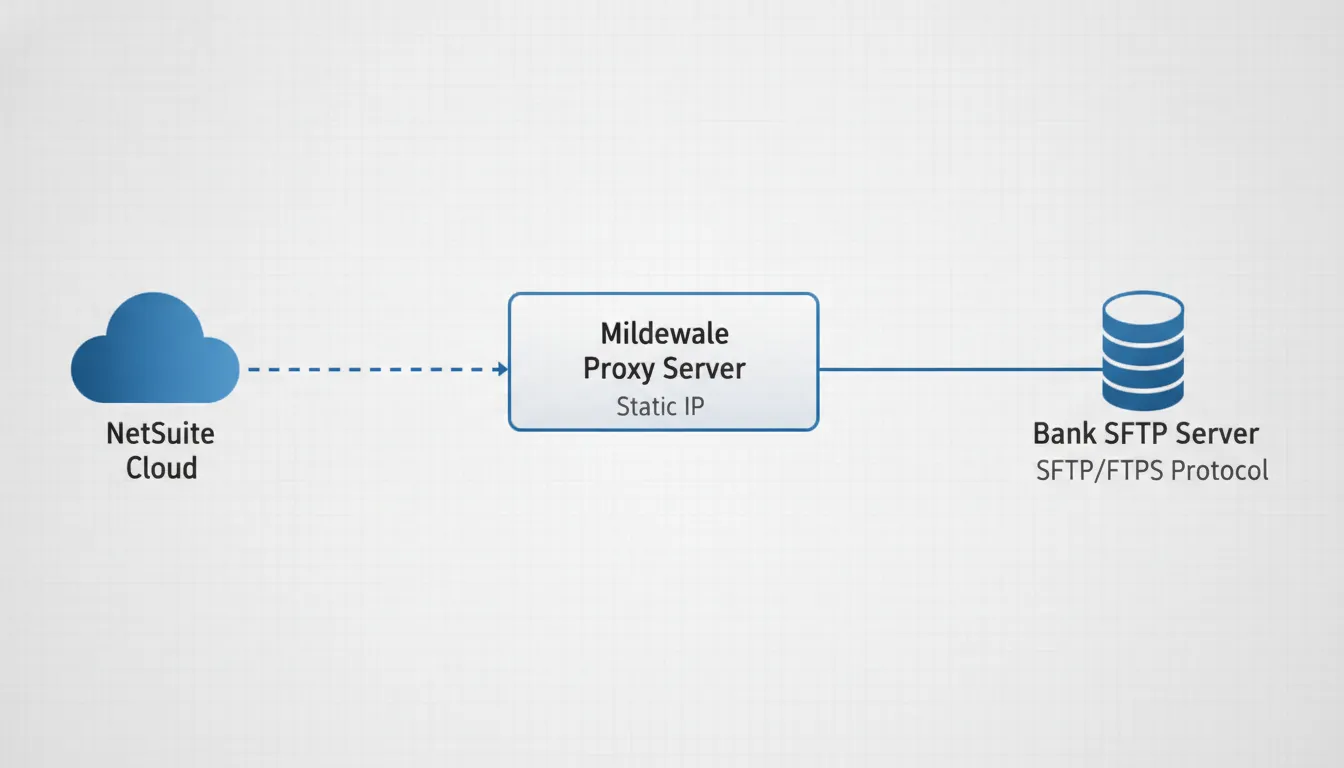
Many enterprise networks and financial institutions enforce strict firewall whitelisting, refusing connection requests from unauthorized IP addresses. This presents a significant hurdle for NetSuite. As a distributed cloud platform, NetSuite’s outbound traffic originates from a dynamically allocated pool of IP addresses that can change without notice. Attempting to whitelist all of NetSuite’s public IP ranges is both insecure and error-prone. So how do architects solve this challenge for their NetSuite SFTP integration?
The recommended solution is a middleware proxy architecture. Instead of connecting directly to the bank or trading partner, NetSuite routes its SFTP traffic through a lightweight proxy server with a dedicated static IP address. This proxy server maintains a predictable, whitelistable IP that the partner can secure in their firewall rules. Common proxy options include an Apache Camel server, a static AWS EC2 instance, or an integration platform as a service connector. The middleware layer also provides additional benefits: it can handle protocol translation, data transformation, and provide a centralized logging and monitoring point for all file transfers. Streams Solutions has deep experience designing these proxy architectures for clients in banking, healthcare, and logistics sectors. Learn more about our POS NetSuite integration approach for retail and omnichannel environments.
Managing Large Payloads and Governance Limits
NetSuite enforces strict governance limits on script execution times and resource usage. When designing file-based flows, architects must account for two distinct file size thresholds. The NetSuite File Cabinet limit of 10MB means standard SuiteScript operations using the N/file module struggle with files larger than that in a single transaction. For massive 3PL inventory files or customer data feeds, developers must split files into smaller batches or stream data progressively using Map/Reduce steps. The N/sftp module has an absolute cap of 100MB, enforced by sftp.MAX_FILE_SIZE = 100000000. Any file exceeding this triggers a FILE_IS_TOO_BIG exception.
Directory listings also have limits. The connection.list() method retrieves a maximum of 5,000 files per execution. To prevent scripts from timing out, implement automated archiving that moves processed files to a remote /processed/ folder or appends a timestamp suffix. This keeps the active directory clean and prevents listing overflow. For organizations handling high-volume file exchanges, our Shopify-NetSuite Accelerator demonstrates how we automate large-scale data processing across integrated platforms.
Error Handling and Alerting Framework
An enterprise NetSuite SFTP integration is only as reliable as its error handling. When connection or transfer failures occur, scripts must fail gracefully and immediately notify the appropriate teams. NetSuite’s N/sftp module throws specific exception codes that you can catch and route intelligently. The table below summarizes the most common exceptions and their recommended resolutions.
| Exception Code | Root Cause | Recommended Resolution |
|---|---|---|
FTP_INCORRECT_HOST_KEY |
The host key fingerprint has changed on the remote server or was entered incorrectly. | Run ssh-keyscan to fetch the updated fingerprint and update your configuration. |
FTP_CONNECT_TIMEOUT_EXCEEDED |
The target server firewall is blocking the connection or network latency is too high. | Verify IP whitelisting rules and ensure your proxy server is online and reachable. |
FTP_FILE_ALREADY_EXISTS |
A file with the same name already exists in the target remote directory. | Append a unique timestamp suffix to filenames or allow overwriting if safe. |
SFTPCREDENTIAL_ENCODING_ERROR |
The GUID token does not match NetSuite’s credential database or has expired. | Redeploy your tokenizer Suitelet and generate a fresh password GUID token. |
FILE_IS_TOO_BIG |
The file exceeds the N/sftp 100MB maximum. | Split the file into smaller chunks using Map/Reduce processing steps. |
By implementing structured try-catch blocks and mapping these specific exception codes, you can route error notifications to the right teams. An FTP_INCORRECT_HOST_KEY alert should reach your systems engineering team immediately, while an FTP_FILE_ALREADY_EXISTS error might trigger an automated retry with a timestamp suffix. For comprehensive operational safety, always set replaceExisting to false during uploads and implement a pre-transmission check against a custom Transmission Registry record. This prevents duplicate financial transmissions and ensures your integration remains idempotent even during unexpected script re-execution. Our HR Payroll NetSuite Accelerator demonstrates this idempotency pattern in production for automated journal entries.
Frequently Asked Questions About NetSuite SFTP Integration
What is NetSuite SFTP integration used for?
NetSuite SFTP integration enables automated, encrypted file transfers between Oracle NetSuite and external systems such as banks, payroll processors, logistics providers, and trading partners. It is commonly used for sending payment files, receiving bank statements, exchanging EDI documents, and automating vendor invoice processing.
Does NetSuite have native SFTP support?
Yes, NetSuite provides native SFTP support through the N/sftp SuiteScript 2.1 module for custom development and the SFTP Connector SuiteApp for no-code configuration. Both options support strong encryption, host key verification, and credential tokenization.
What file size limits apply to NetSuite SFTP transfers?
The N/sftp module supports files up to 100MB, while standard File Cabinet operations through the N/file module handle files up to 10MB per transaction. Files exceeding these limits require splitting into smaller batches or processing through Map/Reduce scripts.
How do you handle password security in NetSuite SFTP scripts?
NetSuite credential tokenization replaces raw passwords with secure GUID tokens. Administrators generate these tokens through a Suitelet form, and NetSuite’s encrypted database resolves them at runtime without exposing the actual password to developers or logs.
Can NetSuite SFTP work with banks that require static IP whitelisting?
Yes, by deploying a middleware proxy server with a dedicated static IP address. NetSuite connects to the proxy, which then forwards the SFTP traffic to the bank. This architecture provides a predictable whitelistable IP while maintaining compliance with the bank’s security requirements.
How do you prevent duplicate payments in automated SFTP transfers?
Implement idempotency controls including pre-transmission checks against a Transmission Registry record, setting replaceExisting to false in upload options, and post-transmission status locking. These safeguards ensure that even if a script executes multiple times, no duplicate financial transactions occur.
What happens when a NetSuite SFTP connection fails?
The N/sftp module throws specific exception codes such as FTP_CONNECT_TIMEOUT_EXCEEDED or FTP_INCORRECT_HOST_KEY. Best practice is to implement try-catch blocks that log the error, send email alerts to the appropriate team, and trigger automated retry logic where applicable.
Does the SFTP Connector SuiteApp support custom data transformations?
The SuiteApp handles standard file transfers but lacks deep custom validation and data transformation capabilities. Organizations requiring complex data mapping, multi-system orchestration, or bespoke error handling typically choose the programmatic N/sftp approach instead.
Secure Your Enterprise Data Exchange Today
A well-architected NetSuite SFTP integration provides the secure, auditable foundation your organization needs for sensitive financial and payroll data. Whether you choose the flexibility of the N/sftp module or the simplicity of the SFTP Connector SuiteApp. Success depends on adhering to strict security protocols, respecting platform governance limits, and designing for operational safety. Streams Solutions specializes in designing, implementing, and maintaining high-security ERP automations that eliminate manual errors and streamline operations. As a certified Oracle NetSuite Alliance Partner with expertise across SuiteScript, SuiteTalk, and SuiteFlow, our team can architect a solution that meets your specific compliance and integration requirements.
Schedule a free consultation with our NetSuite integration architects today. Book your assessment.